
What I Shipped in a 33-Commit Marathon Sprint (March 23, 2026)
33 commits, 219 files, 21 hours. CySA+ launched, battle tutorial built, all cert paths unlocked, email signup fixed, flashcard XP reworked, and 1,100 lines of dead code cleaned.
Builder of SecuSpark. 24 shipped projects across healthcare, defense, and education. Built this platform because textbooks never worked for my ADHD brain — so I turned exam prep into an RPG. @PawelBuilds
Table of Contents
Yesterday I pushed 33 commits across 21 hours. 219 files changed. 25,000 lines added. 13,000 lines deleted. Eight new features, eighteen bug fixes, three codebase cleanup passes, and one new certification fully wired into every system. This is what an all-out sprint looks like when you are building alone.
33
commits
219
files changed
25K
lines added
13K
lines removed
21h
marathon
CySA+ Is Fully Live
The biggest item from yesterday: CySA+ (Cybersecurity Analyst) is now fully integrated across every system in SecuSpark. All 1,785 questions are wired into the battle campaign, PvP arena, flashcard decks, and exam practice modes.
Every single CySA+ question went through the AI enrichment pipeline, adding 12 fields per question:
- Short and long explanations with markdown formatting and real-world context
- Pedagogical hints that guide you without giving away the answer
- Flashcard front and back auto-generated for spaced repetition
- Difficulty rating with justification so you know why a question is marked hard
- Key concept tags for cross-referencing related material
- Exam objective mapping (e.g., "2.1 — Analyze indicators of compromise")
- Why-it-matters context connecting theory to real security work
- Common mistakes explaining why each wrong answer is tempting
- Per-answer explanations breaking down every option individually
CySA+ now has full feature parity with Security+, A+, and Network+. If you are preparing for the CS0-003 exam, everything in SecuSpark works with your certification path out of the box.
Battle Tutorial for New Players
First-time players were landing on the battle hub and not knowing what to do. The campaign map, the enemy nodes, the class system — it is a lot to take in without guidance. So I built a 2-step interactive tutorial that activates automatically for anyone who has never fought a battle.
Step 1 dims the entire battle hub and highlights the frontier enemy node. Your character sprite appears with an animated bobbing motion and a speech bubble: "This is your first enemy! Tap them to see what you are up against." A pulsing arrow points at the enemy to make sure you know where to look.
Step 2 triggers after you open the enemy details. A second speech bubble appears inside the battle preparation sheet: "Ready? Hit Start Battle!" with a highlighted ring around the button.
The tutorial is skippable, persists in localStorage so it never shows again, and auto-detects returning users by checking for prior battle progress. If you have fought even one battle before, you will never see it. The whole thing is responsive — sprite sizes adapt for mobile versus desktop.
All Cert Paths Unlocked
Previously, your career class (chosen during onboarding) determined which certifications you could access in the battle hub. If you picked the Security Analyst path, you could not touch A+ or Network+ campaigns without picking a different class.
That restriction is gone. All five certifications — Security+, A+, Network+, CySA+, and PenTest+ — now unlock automatically based on what is seeded in your local database. If the questions exist, the tab appears. Every path is open from day one.
This was a small change technically (a new useSeededCerts() hook that checks isCertSeeded() at mount), but it is a big change for the experience. Players can explore freely across certifications without artificial career-class restrictions.
Interactive Loot Drops
After winning a battle, loot drops appear on your results screen. Until yesterday, they were just static icons — you could see what you earned but could not interact with it. Now every loot item is clickable.
Tapping an item opens the same detail modal used in the inventory, complete with stats, rarity info, and flavor text. Two actions are available: Equip or Sell. Selling converts the item into XP based on rarity:
| Rarity | XP Reward |
|---|---|
| Common | 15 XP |
| Uncommon | 30 XP |
| Rare | 75 XP |
| Epic | 150 XP |
| Legendary | 300 XP |
This creates a secondary XP loop beyond answering questions. Duplicate drops are no longer wasted — they are quick XP infusions. The sell action auto-closes the modal with a "Sold for +XP!" animation so you can keep moving through your results.
Email Signup Fixed End-to-End
This one was painful. I discovered that the entire email signup flow was broken in production. Google OAuth worked perfectly, but anyone signing up with an email address hit a chain of failures that left them staring at a blank screen.
What Went Wrong
The root cause was a Supabase session race condition. When a user clicked the verification link in their email, the auth callback exchanged the code for a session. Then it called initializeNewUser() to create the character profile. The problem: that function was creating a second Supabase client instead of reusing the one that just authenticated the session. The new client had no session cookies, so Row Level Security silently blocked the profile INSERT. No error, no profile, no character — just a black screen on the battle page.
On top of that, cross-device email verification was completely broken. Supabase uses PKCE for email verification, which stores a code_verifier in localStorage on the browser where signup happened. If you signed up on your laptop but clicked the verification link on your phone, the verifier did not exist — instant failure.
What I Fixed
- Single Supabase client — The authenticated client is now passed through the entire initialization chain. No more orphaned sessions.
- Dual-path auth callback — If the verification URL has a
token_hashparam, it usesverifyOtp()which works on any device without PKCE. If it has acodeparam, it uses the existingexchangeCodeForSession()flow. The email template now sendstoken_hashURLs by default. - Resend verification email — The check-email page now has a resend button with a 30-second cooldown and a "change email" link for typo recovery.
- Graceful null handling —
.maybeSingle()everywhere instead of.single(), loading skeletons for missing profiles, and upsert for profile creation since a database trigger may have already created the row.
Five commits over the span of a few hours, touching auth callbacks, profile initialization, email templates, and the battle page loader. It is working cleanly now across every device combination I have tested.
Flashcard XP Rework
The old flashcard XP system awarded points every 30 seconds just for having the page open. Study for 5 minutes? Great, XP. Leave the tab open during lunch? Also XP. That is not the behavior I want to reward.
The new system tracks per-card study time. When a flashcard appears, a timer starts. When you rate it (Hard, Good, or Easy), the timer stops and you earn 0.5 XP per second of actual study time, capped at 10 XP per card. Fast reviews earn less. Deep study earns more. Leaving the tab idle earns nothing.
It is a small change in code (4 files, 27 insertions, 46 deletions) but a meaningful change in incentives. XP rewards now correlate with genuine engagement instead of passive time-on-page.
Pixel Art Polish
Nine commits went toward fixing how weapons and helmets render on the south-facing character sprite (the default view on profile pages, leaderboards, and inventory).
The core issue: when a character faces south (toward the camera), weapons need to be flipped along both X and Y axes depending on their orientation. A dagger held in the right hand looks correct facing east, but facing south it points the wrong direction. Diagonal-handle weapons like scythes and sickles are even trickier because CSS rotation interacts with the flip transforms.
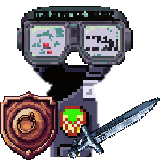
Rather than adding one-off fixes, I built a WEAPON_ITEM_OVERRIDES data map to configure flip, rotation, scale, and offset per weapon. Same approach for helmets: HELMET_ITEM_OVERRIDES handles sizing and clipping. The full-coverage set helmets (42 of them) render larger than regular hats, and the Vishing Headset gets its shirt-and-neck area clipped so it does not conflict with chest armor.
This is the kind of work that does not sound dramatic, but every pixel matters when your character is 128 pixels tall.
Codebase Health: 1,100 Lines Deleted
Between the feature work, I ran three codebase simplification passes across 171 files. The goal: remove dead code, eliminate duplication, and tighten types — without changing any behavior.
Pass 1: API Error Handling
There were approximately 430 instances of duplicated Response.json({{ error }}) patterns spread across 45 API route files. A shared api-errors.ts helper now handles all error responses in one place. I also replaced Record<string, any> with Record<string, unknown> across 11 transform functions and extracted three sprite components from an 1,864-line stats page.
Pass 2: Battle, Clans, PvP
Removed dead refs, duplicate callbacks, stale phase comments, unused constants, collapsed identical switch cases, removed duplicate hex computation functions, dead function definitions, always-undefined variables, and about 70 section-divider comment banners. 41 files, -643 net lines.
Pass 3: Everything Else
Swept through pages, components, hooks, and lib files. Removed unused variables, unnecessary React fragments, non-null assertions (replaced with nullish coalescing), about 90 more comment banners, redundant refetch wrappers, and copy-pasted logic in the question pool. 70 files, -455 net lines.
All three passes: zero behavioral changes, 940+ tests still passing. The codebase is leaner and every file touched is easier to read.
What Is Next
This was one day. I ship like this because the best way to compete as a solo developer is to build faster than everyone else in the space. If you are studying for Security+, A+, Network+, CySA+, or PenTest+, come see what gamified certification prep actually looks like.

Earn XP while you study
Battle bosses while studying for Security+
Earn XP, level up, and master domains in the only RPG cert prep game. Free to start.
Stop Reading, Start Practicing
7,500+ practice questions across 7 certification paths: Security+, A+, Network+, CySA+, PenTest+, SecAI+, and Claude Architect. 3 free exams per cert to start. Campaign Pass unlocks all exams, premium AI deep dives, and the RPG battle campaign.
Free Study Tools
Related Articles
SecuSpark 2.0 — The Guilds Update: Cert Prep Just Became a Multiplayer RPG
Guilds with living pixel forts, a real-time PvP arena, an earn-only Embers economy, PenTest+ as a fifth cert path, FSRS flashcards, and every screen rebuilt. The biggest SecuSpark release ever, explained.
149 Enemies, 3 Career Classes, and Premium AI Deep Dives: SecuSpark's Biggest Content Drop
SecuSpark expands to 210 unique cybersecurity enemies, introduces a 3-class career identity system with evolution paths, and enriches the 7,500+ question bank with premium AI deep dives, hints, and flashcards. The largest update in SecuSpark history.