
Meet the 149 Cyber Threats You'll Battle in SecuSpark: The Complete Visual Bestiary
A visual guide to every enemy in SecuSpark's RPG battle system. From Phishing Ghosts to Zero-Day Phoenixes to APT Overlords, all 149 enemies represent real cybersecurity threats from the CompTIA Security+, A+, and Network+ exam objectives. Learn the threats while you fight them.
Builder of SecuSpark. 24 shipped projects across healthcare, defense, and education. Built this platform because textbooks never worked for my ADHD brain — so I turned exam prep into an RPG. @PawelBuilds
Table of Contents
Every enemy in SecuSpark's Battle Mode represents a real cybersecurity threat -- the same threats you will encounter on the CompTIA Security+, A+, and Network+ exams. With 149 unique enemies across every exam domain, we designed each one to be visually memorable so that when you see "phishing" on your exam, you instantly recall that sneaky ghost you fought 50 times. Here is the complete bestiary.
All 149 enemies are organized by threat category below. Each entry includes the enemy's pixel art sprite, the real-world cybersecurity concept it represents, and why it matters for your certification exam. We started with 25 enemies in February 2026 and have since expanded the roster to cover every major topic across all three CompTIA certifications.
Social Engineering & Human Threats
Social engineering attacks exploit human psychology rather than technical vulnerabilities. These enemies are among the trickiest because, just like real social engineering, they rely on deception.

Phishing Ghost
A translucent specter dangling a lure. Phishing attacks use deceptive emails, messages, or websites to trick users into revealing credentials or clicking malicious links. It remains the #1 initial attack vector worldwide.

Social Engineer Fox
A cunning fox with a clipboard -- looking official while gathering your secrets. Social engineering encompasses pretexting, baiting, tailgating, and other human-targeting techniques that bypass technical controls entirely.
Rogue AP Mimic
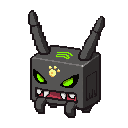
A shapeshifter posing as a friendly Wi-Fi access point. Rogue APs (also called evil twins) are unauthorized wireless access points set up to intercept traffic. Connecting to "Free_Coffee_WiFi" at a cafe could mean connecting to an attacker.
Security Foundations & Governance
These enemies represent the fundamental security concepts and governance frameworks that underpin everything in cybersecurity.

Firewall Golem
A stone golem with glowing firewall rules on its chest. Firewalls are the first line of network defense, filtering traffic based on rules. Understanding ACLs, stateful vs. stateless inspection, and next-gen firewall features is essential for Security+.

Compliance Chimera
A three-part chimera of audits, policies, and regulations. Compliance frameworks like GDPR, HIPAA, PCI-DSS, and SOX define how organizations must protect data. Understanding regulatory requirements and audit processes is critical for the Security+ governance domain.
Malware & Code-Based Threats
Malware is malicious software designed to infiltrate, damage, or take control of systems. These enemies represent the different forms malware takes in the wild.

Malware Slime
A toxic purple blob with menacing fangs. Generic malware is the umbrella term for viruses, worms, trojans, and other malicious code. Understanding malware classification is a key CompTIA exam objective.

Ransomware Golem
An armored juggernaut that locks down everything it touches. Ransomware encrypts victim files and demands payment for decryption keys. High-profile attacks on hospitals, pipelines, and city governments have made this the most feared malware category.

Rootkit Beetle
A dark beetle that burrows deep into the system. Rootkits hide at the kernel or firmware level, granting persistent privileged access while evading detection. They are notoriously difficult to remove -- sometimes requiring a full system rebuild.

Cryptojacker Sprite
A golden winged creature mining away on stolen resources. Cryptojacking secretly uses a victim's computing power to mine cryptocurrency. Signs include degraded performance, high CPU usage, and increased power consumption.

Corrupted File Bat
A bat made of glitched data fragments. Data corruption through malicious file modifications threatens data integrity -- one of the three pillars of the CIA triad. File integrity monitoring (FIM) tools help detect unauthorized changes.
Network & Infrastructure Attacks
These enemies target the network itself -- intercepting traffic, poisoning routing tables, overwhelming servers, or exploiting protocol weaknesses.

DDoS Storm Cloud
An angry thundercloud raining destruction. Distributed Denial-of-Service attacks overwhelm targets with traffic from thousands of compromised devices (botnets). Mitigation includes rate limiting, CDNs, and traffic scrubbing services.

MitM Shadow
A shadow that sits between two parties, invisible to both. Man-in-the-Middle attacks intercept communication between two endpoints. TLS/SSL encryption, certificate pinning, and HSTS headers help prevent these attacks.

DNS Poison Toad
A toxic toad contaminating the DNS well. DNS cache poisoning corrupts the DNS resolver cache, redirecting users to malicious sites even when they type the correct URL. DNSSEC provides cryptographic authentication of DNS responses.

Packet Loss Phantom
A phantom that devours network packets mid-flight. Packet loss degrades network performance and can indicate congestion, hardware failure, or active interference. Tools like ping, traceroute, and Wireshark help diagnose the cause.

Bandwidth Hog
A greedy creature consuming all available bandwidth. Whether from legitimate overuse or malicious traffic flooding, bandwidth exhaustion can cripple network services. QoS policies, traffic shaping, and monitoring tools are your defenses.

Latency Turtle
A slow-moving turtle that drags everything to a crawl. High latency causes delays in data transmission, affecting application performance and user experience. Causes include network congestion, routing issues, and physical distance to servers.

Firewall Breaker Ram
A muscular ram charging straight through defenses. Firewall evasion techniques include tunneling traffic through allowed ports, fragmenting packets, and exploiting misconfigured rules. Defense-in-depth prevents single points of failure.

Firewall Fox
A sly fox peering through gaps in ACL rules. While the Breaker Ram uses brute force, the Firewall Fox finds subtle misconfigurations -- open ports, overly permissive rules, and gaps in packet inspection. Proper rule ordering and regular audits are your defense.

Switch Specter
A ghost rising from a network switch with glowing port LEDs. Switch misconfigurations, VLAN hopping, MAC flooding, and spanning tree issues can devastate network performance. Understanding Layer 2 security is a key Network+ and Security+ topic.

OSI Ogre
A layered ogre with seven colored stripes representing the OSI model. Understanding which protocols and devices operate at each layer -- from Physical to Application -- is foundational Network+ knowledge that appears on virtually every exam.

Monitoring Mole
A mole with a hardhat inspecting network dashboards. SNMP traps, syslog analysis, NetFlow monitoring, and baseline deviation detection are critical for network operations. Without proper monitoring, threats go undetected until damage is done.
Application & Code Exploits
These enemies target software vulnerabilities -- injecting malicious code, exploiting buffer overflows, and taking advantage of coding mistakes.

SQL Injection Snake
A slithering snake that injects venom into databases. SQL injection inserts malicious SQL code through application input fields to manipulate databases. Parameterized queries, input validation, and WAFs are primary defenses.

Zero-Day Phoenix
A mythical firebird that rises from unknown vulnerabilities. Zero-day exploits target vulnerabilities with no existing patch. They are the most dangerous threats because traditional signature-based defenses cannot detect them. Behavioral analysis and zero-trust architectures are critical countermeasures.

Loop Storm Tornado
A whirling tornado of endless loops. Logic bombs and fork bombs exhaust system resources through recursive or infinite processes. Resource limits, process monitoring, and code review help prevent these denial-of-service conditions.
Hardware & Physical Threats
Not all threats come through the network. These enemies represent physical-layer and hardware-level attacks that many IT professionals overlook.

Dust Bunny
An angry ball of accumulated dust. Physical maintenance is no joke -- dust buildup causes overheating, hardware failure, and reduced component lifespan. Regular cleaning, proper airflow, and environmental controls are essential for A+ and data center operations.

Overheating Imp
A fiery demon sitting on overworked hardware. Thermal management failures cause throttling, system instability, and permanent damage. Monitoring tools, proper cooling solutions, and thermal paste application are A+ exam essentials.
Cable Gremlin
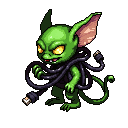
A mischievous creature tangling and chewing cables. Cabling issues account for a huge percentage of network problems. Understanding cable types (Cat5e/6/6a), TIA-568 standards, and troubleshooting tools like cable testers is fundamental Network+ knowledge.

Dead Pixel Spider
A dark spider spreading display defects across screens. Display troubleshooting -- dead pixels, backlight bleed, flickering, and resolution issues -- is a common A+ exam topic and everyday help desk challenge.

Screen Cracker
A tiny imp with hammer fists leaving spiderweb cracks on every screen it touches. Mobile device damage -- cracked screens, unresponsive digitizers, and water damage -- is one of the most common A+ troubleshooting scenarios you will face in the field.
RAM Rat
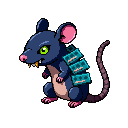
A rat whose body is made of RAM DIMMs, nibbling on CPU sockets. Memory issues cause blue screens, random reboots, and data corruption. Understanding DDR types, memory channels, ECC vs. non-ECC, and diagnostic tools like MemTest86 is core A+ material.
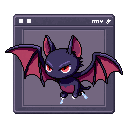
VM Vampire
A vampire bat wrapped in a VM window frame, draining host resources. Virtual machine sprawl, resource overcommitment, and improper snapshot management can bring hypervisors to their knees. VM lifecycle management is increasingly important for A+ and cloud-focused exams.
System & Configuration Threats
These enemies exploit misconfigured systems, driver conflicts, and the chaos that comes from poorly managed IT infrastructure.

BIOS Phantom
A phantom lurking in the firmware layer. BIOS/UEFI attacks are among the most persistent threats because they survive OS reinstalls. Secure Boot, TPM chips, and firmware updates are critical defenses covered on both A+ and Security+ exams.

Driver Conflict Hydra
A multi-headed beast where fixing one problem creates two more. Driver conflicts cause BSODs, device failures, and system instability. Device Manager, driver rollback, and understanding driver signing are core A+ troubleshooting skills.

Blue Screen Specter
The dreaded blue ghost that crashes everything. The Blue Screen of Death (BSOD) indicates a critical system error. Understanding stop codes, memory dumps, and Event Viewer analysis is essential A+ troubleshooting knowledge.

BSOD Bandit
A bandit wearing a blue screen mask with a sad-face emoticon and a lasso of error codes. While the Specter represents the crash itself, the Bandit represents the hunt for root causes -- faulty drivers, memory errors, and hardware conflicts that require systematic troubleshooting.
18 Boss-Tier Enemies
Boss battles are 10-question encounters with higher stakes and better rewards. With Wave 4, we added 15 campaign bosses -- one for every major domain across all certifications. Combined with the 3 original bosses, there are now 18 boss-tier enemies guarding the path to your certification.
Security+ Bosses

CIA Triad Hydra
A three-headed dragon: Confidentiality (ice), Integrity (crystal), and Availability (fire). The CIA triad is the foundation of all security. You must understand how every control maps to these three pillars.

APT Overlord
A cloaked shadow lord with persistent threat aura. Advanced Persistent Threats are the most sophisticated attackers -- nation-state actors who maintain long-term access. Detecting and responding to APTs requires threat intelligence, behavioral analysis, and layered defenses.

Architecture Archon
A crystal guardian built from network topology diagrams. Security architecture encompasses network segmentation, defense-in-depth, zero-trust models, and secure design principles. This boss tests your understanding of how all the pieces fit together.
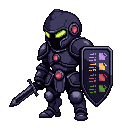
SOC Sentinel
An armored knight with a shield of monitoring screens. The Security Operations Center is the nerve center of cyber defense. SIEM tools, incident response procedures, log analysis, and alert triage are all tested in the Security+ operations domain.
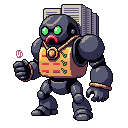
Governance Guardian
A bureaucratic golem of stacked policy documents with rubber stamp fists. Security governance covers risk management frameworks, security policies, compliance requirements, and organizational security culture. The paperwork matters.
Zero-Day Phoenix
The ultimate Security+ boss. Unknown vulnerabilities with no patch -- you need deep knowledge of behavioral analysis, threat intelligence, and zero-trust architecture to defeat this one.
Ransomware Golem
A domain boss that tests your incident response knowledge. You will need to know backup strategies (3-2-1 rule), network segmentation, and why you should never pay the ransom.
A+ Bosses

Mobile Menace
A giant cracked smartphone with an angry face. Mobile device troubleshooting, MDM policies, BYOD security, and wireless configuration make up a significant portion of the A+ exam. This boss covers it all.

Router Reaper
A hooded skeleton wielding a WiFi router as a scythe. Home and enterprise networking -- IP configuration, DNS, DHCP, port forwarding, and wireless troubleshooting -- is a cornerstone of A+ knowledge.

BIOS Behemoth
A massive motherboard golem with POST text scrolling across its chest. Hardware fundamentals -- BIOS/UEFI configuration, boot sequences, motherboard components, and firmware updates -- form the bedrock of A+ certification.
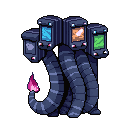
Hypervisor Hydra
A multi-headed serpent with Windows, Linux, and Mac OS window frames as heads. Virtualization and cloud computing -- Type 1 vs. Type 2 hypervisors, containers, IaaS/PaaS/SaaS models -- are increasingly tested on the A+ exam.

Troubleshoot Titan
A giant with a multimeter arm and screwdriver arm. The A+ troubleshooting domain tests your methodology -- identify the problem, establish a theory, test, implement, verify, and document. This boss demands you follow the process.
Driver Conflict Hydra
Like the mythical Hydra, solving one driver issue reveals two more. You will need deep knowledge of Device Manager, Safe Mode, and system restore strategies.
Network+ Bosses

Protocol Overlord
A seven-layered tower creature representing the OSI model. Each colored segment maps to a network layer. To defeat this boss, you need to know which protocols, devices, and PDUs operate at each layer -- the backbone of networking knowledge.
Infrastructure Titan
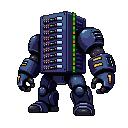
A giant made of server racks and fiber optic cables. Network implementation -- cable types, rack configurations, switch management, wireless standards, and structured cabling -- is hands-on knowledge every network professional needs.

Uptime Overlord
A clock-themed guardian demanding 99.999% uptime. Network operations -- monitoring, documentation, backup procedures, change management, and SLA compliance -- keep infrastructure running. This boss tests your operational discipline.

Exploit Emperor
An armored emperor with a cape of scrolling exploit code. Network security encompasses IDS/IPS, VPNs, access control, wireless security protocols, and vulnerability management. The Emperor demands mastery of all defensive layers.

Outage Oracle
A dark crystal ball showing network-down symbols. Network troubleshooting is the final boss domain -- using command-line tools (ping, traceroute, nslookup, netstat), interpreting logs, and following a systematic methodology to restore connectivity.
Firewall Breaker Ram
An armored battering ram charging through firewall barriers. This boss tests your knowledge of firewall types, evasion techniques, and defense-in-depth strategies that prevent single points of failure.
Why Visual Enemies Help You Learn
There is solid science behind why fighting a Phishing Ghost or an APT Overlord helps you remember cybersecurity concepts better than reading a textbook:
- Dual coding theory: Information encoded both visually and verbally is retained significantly better than text alone. When you associate "phishing" with a specific visual character you have fought repeatedly, you create two memory pathways instead of one.
- Emotional engagement: The stakes of battle (winning loot vs. losing health) create emotional arousal that enhances memory consolidation. You remember fights you barely won far better than paragraphs you barely read.
- Spaced repetition through gameplay: Because enemies appear across multiple battles, you encounter the same concepts repeatedly over time -- the natural spacing that research shows optimizes long-term retention.
- Active recall: Every battle question forces you to retrieve information from memory rather than passively recognize it. Active recall is the single most effective study technique according to cognitive science research.
Start Fighting Cyber Threats Today
All 149 enemies are waiting for you in SecuSpark Battle Mode. Each one represents real exam content that you need to master for your CompTIA certification. The difference is that now you are learning through combat instead of rote memorization.
Your first battle takes 30 seconds to start -- no signup required.

Earn XP while you study
Battle bosses while studying for Security+
Earn XP, level up, and master domains in the only RPG cert prep game. Free to start.
Which enemy will you defeat first?
210 cybersecurity threats. 7,500+ questions. Your certification awaits.
Enter Battle ModeStop Reading, Start Practicing
7,500+ practice questions across 7 certification paths: Security+, A+, Network+, CySA+, PenTest+, SecAI+, and Claude Architect. 3 free exams per cert to start. Campaign Pass unlocks all exams, premium AI deep dives, and the RPG battle campaign.
Free Study Tools
Related Articles
Gear That Finally Fits: Every Item on Every Slime Body
SecuSpark's 260 items now fit all 30 slime bodies: every helmet hand-placed, every slot measured per body. What broke, what changed, and seven full sets.
SecuSpark: The MMORPG for Learning CompTIA Certifications (Free)
SecuSpark turns CompTIA certification prep into a full RPG experience. Battle cybersecurity enemies, collect loot, evolve your character through 30 stages, compete in PvP arenas, and start Security+, A+, Network+, CySA+, and PenTest+ for free.